More Thoughts on Marimo...


In a previous post, Is Marimo the New Jupyter Notebook?, I wrote about all of the great things that Marimo has to offer. While I still think Marimo is an exciting new tool, I tried using it for a few analyses and found myself wishing I was using Jupyter instead. Here are a few new learnings (and frustrations) I’ve run into while using Marimo:
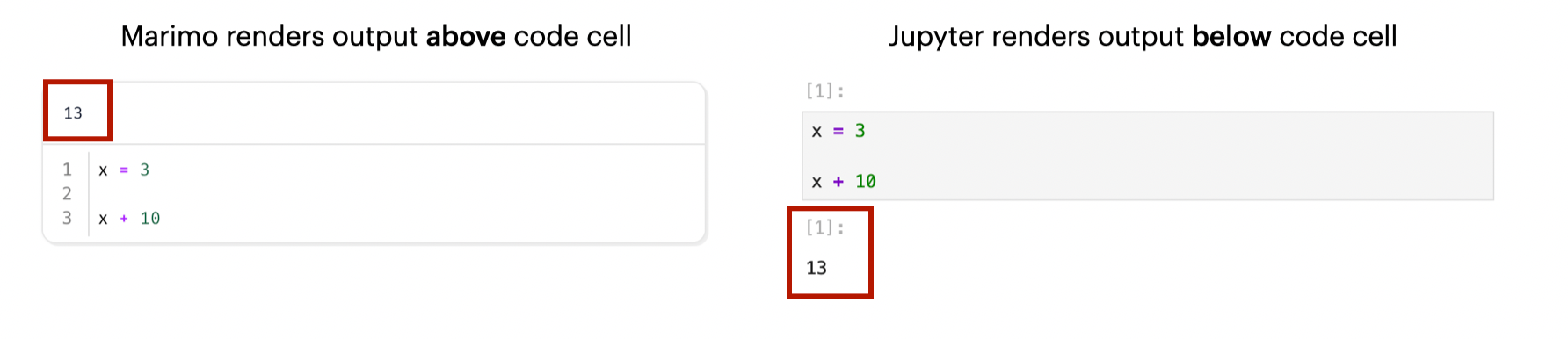
- Unintuitive user interface: Marimo renders its output above the code cell, while Jupyter renders the output below. This might sound trivial, but when you’re deep in a notebook, having to scroll up to see results breaks the flow. I much prefer the “code → output” structure that Jupyter uses.
- I miss using Cursor!!: Cursor, which is VS Code under the hood, has a Jupyter extension that makes it easy to integrate notebooks with its AI-assisted IDE. With Marimo, that seamless workflow disappears, and I really feel it.
- Tightly coupled to OpenAI: Marimo’s built-in AI assistant seems to be locked into OpenAI. I like switching between models — especially Claude Sonnet, which sometimes gives me better results for code reviews and debugging. Unfortunately, Marimo doesn’t seem to offer that flexibility (at least for now).
- Interestingly, the Marimo team recently shared a post about using Claude Code with Marimo, but to me, that feels like a bit of a workaround rather than a real solution. If you’re already offering an AI assistant inside the app, why not let users choose which model powers it?
- Limited terminal interactivity: Marimo doesn’t support shell-style commands – things like
!which python,!ls, or!pip listor even!pip install. I sometimes need these commands to quickly check which interpreter I’m using, to troubleshoot path issues, or install a missing dependency. I wish I could interact with the underlying environment the way I can in Jupyter. - Risk of losing work: This is probably my biggest complaint of Marimo - it doesn't autosave new files!! If your environment crashes or you accidentally close the browser tab, you can lose unsaved progress. This has happened to me on a couple of occasions and honestly, it's a terrible feeling. I'm so used to Jupyter which autosaves by default.
So, given these new learnings – am I giving up on Marimo entirely? No. It’s still early days, and I love what the Marimo team is trying to build. But at this point, I'm not ready to entirely give up on the beloved Jupyter notebook 🫶.
Have you tried Marimo yet? I’d love to hear your first impressions — especially if you’ve found ways around some of these quirks.